
TubeMagic vs vidIQ: Which YouTube Tool Is Better for Creators?
TubeMagic and vidIQ both aim to help YouTube creators, but they approach the workflow from different angles. TubeMagic is built to produce finished content (scripts, titles, descriptions, tags) from a topic or idea. vidIQ is built around research and channel intelligence: keywords, competitors, and analytics, with content-generation features layered on top. That’s a real difference in emphasis, not a clean split. Both tools overlap more than their marketing might suggest, and neither is simply “the scripts one” or “the SEO one.”
Quick Answer
TubeMagic makes more sense if you want AI to produce a usable script, title, description, and tags end-to-end, and you’re comfortable paying for a subscription with no free tier.
vidIQ makes more sense if you want to research what’s actually working in your niche — keywords, competitors, trends — before deciding what to make, and you’d like a genuinely free tier to start with.
There’s no overall winner — see below for what actually differs.
TubeMagic vs vidIQ at a Glance
| Criterion | TubeMagic | vidIQ |
|---|---|---|
| Primary emphasis | End-to-end content generation (scripts, metadata) | Research and channel intelligence, with content generation layered on top |
| Idea generation | Yes — video ideas/research generator | Yes — AI Coach idea generation |
| Script assistance | Yes, core product — full script writer plus transcript/article/video-to-script converters | Yes, but a supporting feature — a dedicated Script Writer and a broader AI Content Generator |
| Keyword/topic research | Yes — keyword research, niche explorer, top-video finder | Yes, core product — keyword/trend research is vidIQ’s flagship strength |
| Titles/descriptions | Yes — dedicated generators for both, plus tags | Yes — via AI Coach/Content Generator |
| Thumbnail support | Yes — AI thumbnail generator | Yes — a Thumbnail Maker (per secondary sources, not independently confirmed on a first-party page this pass) |
| Analytics/channel intelligence | Not a stated focus | Yes, core product |
| Competitor research | A “top-video finder” tool | Yes, core product — a dedicated Competitors tool with detailed metrics |
| Workflow style | Standalone web app producing finished assets | Web app plus a browser extension (per secondary sources) |
| Free access | None — no free tier, only a money-back guarantee | Yes — a genuinely usable free tier |
| Pricing model | Subscription: $47/month billed monthly, or $497/year (displayed as approximately $41/month, “Annual Save 20%”) | Subscription with a free tier; paid tiers add more AI credits and features — see Free Access and Pricing below |
| Best fit | Creators who want AI to produce finished scripts/metadata quickly | Creators who want data to inform their own content decisions |
| Main limitation | No free tier; no independent (non-vendor) rating could be confirmed | Feature specifics below are partly sourced from indexed vendor pages rather than a fully verified first-party review |
What TubeMagic focuses on
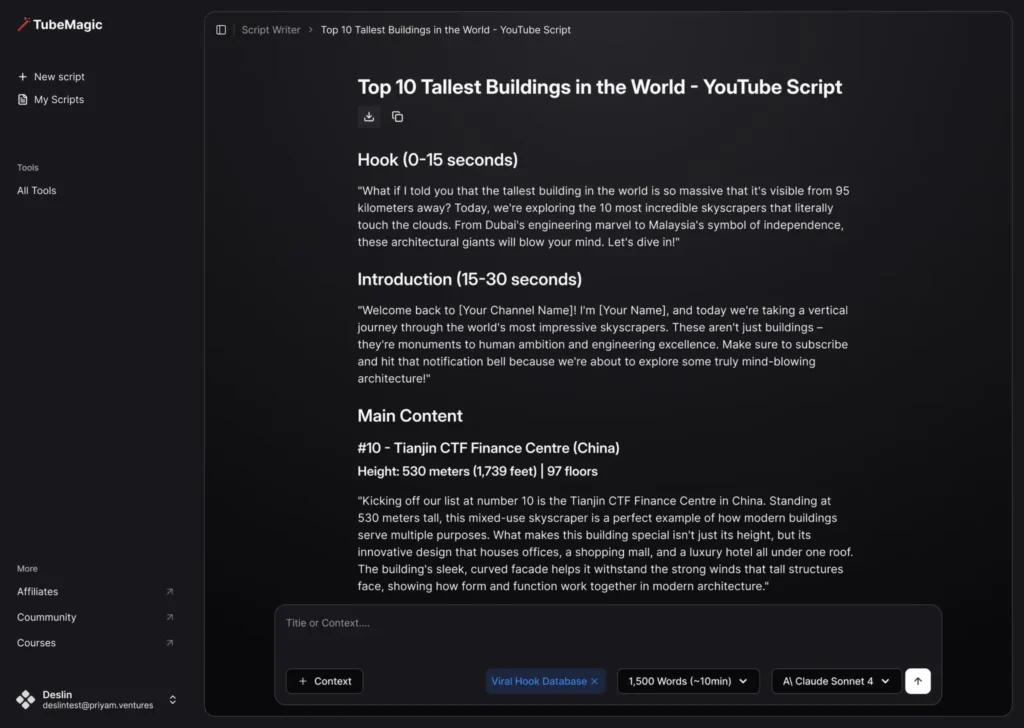
TubeMagic is built to take a creator from an idea to a finished, publishable video package. Its feature set includes an AI script writer, a video ideas/research generator, keyword research, a niche explorer, and a “top-video finder,” alongside an AI thumbnail generator, title/description/tag generators, a channel-name generator, and community-post drafting. The paid Premium tier, its only tier since there’s no free option, gives access to all of these tools together, with generation limits of up to 100 uses per day per tool on standard credits, plus 500 premium credits per month that give access to more advanced models for heavier use. In short, TubeMagic’s job is to hand a creator most of what they need to publish, rather than to help them decide what’s worth publishing in the first place.
What vidIQ focuses on
vidIQ’s center of gravity is research: keyword and trend discovery, competitor tracking (seeing what’s performing for similar channels, including thumbnails, titles, and view counts), and channel analytics. According to vidIQ’s own feature pages, it has also built AI-assisted tools on top of that research core — an “AI Coach” offering title creation, idea generation, and script assistance on its free tier, plus a separate, more dedicated Script Writer and a general AI Content Generator that can produce a script, outline, title, description, tags, and thumbnail ideas from a single topic. A sourcing note worth stating plainly: several of these vidIQ feature details come from the company’s own published page titles and summaries surfaced through search, rather than a fully accessible first-party page fetch. Treat them as vendor-stated rather than independently confirmed in exhaustive detail.
Which is better for video ideas?
Both offer idea generation, and neither has a meaningfully stronger, independently-verified claim here. TubeMagic’s ideas tool is built around generating and researching video ideas directly; vidIQ’s AI Coach offers idea generation as one of several free-tier features, feeding off the research data (trends, niche performance) vidIQ already collects. If you want ideas grounded in explicit competitor/trend data, vidIQ’s research context arguably gives it an edge; if you want an idea generator that flows directly into a finished script, TubeMagic’s pipeline is more end-to-end.
Which is better for scripting?
This is where the “TubeMagic = scripts” shorthand is closest to true, but still an oversimplification. TubeMagic’s script writer is its core product, purpose-built around producing a full script from a topic, plus converters that turn a transcript, article, or existing video into a script. vidIQ’s Script Writer and AI Content Generator can also produce full scripts and outlines — a real capability, not a minor add-on — but it sits inside a broader research-first product rather than being the product’s reason for existing. If scripting is your main need, TubeMagic is built specifically around it; vidIQ can do it too, but it’s not what the product is best known or built for.
Which is better for keyword and topic research?
vidIQ, clearly. Deep keyword and trend research is vidIQ’s flagship strength and the reason many creators use it at all. TubeMagic has keyword research and a niche explorer as supporting tools within its broader package, but research isn’t its organizing focus the way content generation is.
Neither tool is really built to be a dedicated keyword-data engine, though — if you want more granular volume, CPC, and competition numbers than either includes, Keywords Everywhere is a complementary browser extension worth layering on top of whichever one you pick. It doesn’t compete with TubeMagic or vidIQ’s broader feature sets (scripting, analytics, optimization); it’s specifically for keyword and search-volume data, with YouTube as one of the platforms it covers directly. The free tier needs no signup, and paid credits start at $84/year for 100,000 credits.
Try Keywords EverywhereWhich is better for channel analytics?
vidIQ again — channel analytics is a core part of its product, not something TubeMagic’s feature set claims to offer. If ongoing performance tracking and channel-level insight is what you need, that’s vidIQ’s territory.
Which is better for competitor research?
Both have a tool here, but with different depth. vidIQ’s dedicated Competitors tool is built specifically for this — surfacing competitors’ best-performing content with metrics like thumbnails, titles, views, and upload times. TubeMagic’s “top-video finder” serves an adjacent purpose but reads as a supporting research tool within a content-generation product rather than a dedicated competitive-intelligence feature.
Which is easier for day-to-day content creation?
If “easier” means fewer steps between an idea and a publishable video asset, TubeMagic’s pipeline is more direct: it’s designed to hand you a script, title, description, and tags in one pass. vidIQ’s workflow generally involves more of your own judgment; it shows you the research, and you (or its supporting AI tools) still do more of the work of turning that into finished content. Neither approach is “easier” in an absolute sense. It depends on whether you want a tool that decides less for you (vidIQ) or one that produces more for you outright (TubeMagic).
Free access and pricing
TubeMagic has no free tier. Pricing, checked directly against the current official pricing page: $47 per month when billed monthly, or $497 per year when billed annually — the annual plan is displayed on the page as approximately $41 per month, with an “Annual Save (20%)” label. Both the monthly and annual Premium plans currently include all tools unlocked, up to 100 generations per day per tool, 500 premium credits per month, access to premium models including Claude Opus 4.6, and priority support; the annual plan additionally includes a “Tube AI System Course” not offered on the monthly plan. TubeMagic backs this with a 30-day money-back guarantee, though free trials are currently disabled by the vendor.
vidIQ offers a genuinely free tier, a real starting point rather than a time-limited trial, plus paid plans above that (commonly referred to as “Boost” and “Max”) that add more AI credits and features. vidIQ’s own pricing page wasn’t independently accessible during this research pass, so rather than publish specific paid-tier dollar figures we can’t confirm firsthand, we’d rather point you to the source: confirm current vidIQ pricing directly on its official pricing page before deciding.
Who should choose TubeMagic?
Creators who want AI to produce a finished script, title, description, and tags with minimal manual assembly, and who are comfortable paying for a subscription with no free option to test first.
Who should choose vidIQ?
Creators who want to base their content decisions on real keyword, trend, and competitor data first, and who want the option to start for free before paying for anything.
Explore TubeMagicVerdict
TubeMagic makes more sense for a creator whose bottleneck is producing finished content quickly, especially at higher volume. vidIQ makes more sense for a creator whose bottleneck is knowing what to make in the first place, or who wants ongoing channel analytics alongside that research. Some creators may reasonably want both, using vidIQ’s research to decide what to make and a script tool to help produce it. For the fuller picture on TubeMagic specifically, see our TubeMagic review. If you’ve already chosen a script tool and want to make sure the output doesn’t read as generic AI writing, see our guide on using AI for YouTube scripts without sounding generic. And for a wider look at the AI tool landscape beyond just these two, see our breakdown of AI tools for YouTube creators by category.
Weighing more than just these two? See our full TubeMagic alternatives comparison, or if keyword and topic research specifically is your focus, our guide to the best YouTube keyword research tools.
Sources & References
- TubeMagic official pricing page (tubemagic.com/pricing) — pricing, plan inclusions, guarantee, free-trial status; monthly/annual figures confirmed via direct human visual verification of the live page
- TubeMagic official features and about pages (tubemagic.com/features, tubemagic.com/about) — feature set, company background
- vidIQ official feature-page titles and summaries (vidiq.com, support.vidiq.com), surfaced via search indexing rather than a fully accessible direct page fetch — see the sourcing note in “What vidIQ focuses on” above